










Item out of stock
Selling fast! Item low in stock
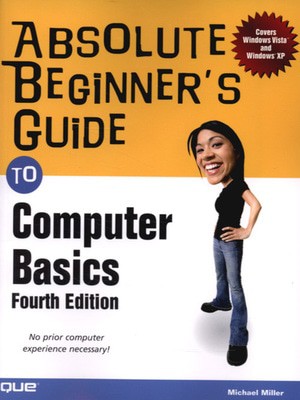
Absolute beginner's guide to computer basics - Michael Miller
Oops!
Unfortunately it looks like someone took the last one.
Unfortunately it looks like someone took the last one.
No worries, we have many more interesting finds for you.
Browse similar
Why choose musicMagpie?
Title
Absolute beginner's guide to computer basics
Absolute beginner's guide to computer basics
Author
Michael Miller
Michael Miller
format
Paperback / softback
Paperback / softback
Publisher
Que
Que
Language
English
English
UK Publication Date
20070228
20070228
Description
Who knew how simple computers could be?
What can you do with your new PC? The sky's the limit! Absolute Beginner's Guide to Computer Basics will show you how to set up and configure your PC, including how to connect to the Internet. Then you'll learn how to fix your digital photos, create digital scrapbooks, download digital music to your iPod, burn your own custom CDs, watch DVD movies, write letters and memos, balance your checkbook, and create show-stopping presentations. And if you need more computing horsepower, you'll even learn how to upgrade your PC and add new peripherals. It's all easy, thanks to Michael Miller's step-by-step instructions and helpful advice!
Now updated for both Windows VistaT and Windows XP, Absolute Beginner's Guide to Computer Basics will have you using your new PC in no time! Here's a preview of
what you'll find inside:
- Learn how to set up and configure your new computer, and install new computer hardware and software
- Get the scoop on how to work with Microsoft Windows XP or Windows Vista, and how to personalize it just for you
- Learn how to use the most popular computer programs-including Microsoft
Word, Microsoft
Works, Microsoft
Money, and Quicken - Connect to the Internet for web surfing, email, instant messaging, blogging, and podcasts-and create your own MySpace page
- Become a digital media pro-learn to work with digital cameras and photos, download and listen to digital music, and burn your own CDs and DVDs
- Find out how to protect your PC from spam, viruses, spyware, and computer attacks
- Learn how to set up a wireless home network and share your Internet connection with multiple PCs
Introduction
I
Getting Started
1 Understanding Desktop PCs
2 Understanding Notebook PCs
3 Setting Up Your New Computer System
II Using Windows
4 Getting to Know Windows Vista
6 Personalizing Windows
7 Working with Files, Folders, and Disks
III Upgrading and Maintaining Your System
9 Setting Up a Home Network
11 Dealing with Common Problems
12 Protecting Your PC from Viruses, Spam, and Other Online
IV Using Computer Software
13 Installing New Software
14 The Suite Spot: Working with Microsoft Works and Microsoft
15 Letters, Memos, and More: Working with Microsoft Word
16 Crunching Numbers: Working with Microsoft Excel
17 Presenting Yourself: Working with Microsoft PowerPoint
18 Banking and Beyond: Working with Microsoft Money and Quicken
19 Connecting to the Internet-At Home and on the Road
V Using the Internet
20 Sending and Receiving Email
21 Surfing the Web with Internet Explorer
22 Searching the Web
23 Shopping Online
24 Buying and Selling in eBay Online Auctions
25 Exploring Blogs and Podcasts
26 Social Networking with MySpace
27 Creating Your Own Web Page
28 Exploring Other Cool and Useful Websites
29 Sending and Receiving Instant Messages
VI Exploring the Digital Lifestyle
30 Using Your PC with a Digital Camera
31 Organizing and Editing Your Digital Photos
32 Sharing Your Digital Photos Online
33 Playing, Ripping, and Burning CDs
34 Downloading and Playing Digital Music
35 Using Your PC with an iPod or MP3 Player
36 Playing DVDs and Videos on Your PC
37 Downloading and Playing Videos from the Web
38 Making Your Own Digital Home Movies
Index
Michael Miller is the best-selling author of more than 75 how-to books, covering topics such as Windows XP and eBay online auctions. Michael has helped more than a million readers be productive with their PCs and has earned a reputation for practical advice, technical accuracy, and making difficult topics easy to understand.
Category: Computers & Internet
Covers:
General Computing
User Level:
Beginning
$21.99 USA / $26.99 CAN / 15.99 Net UK
www.quepublishing.com
]]>Why buy with musicMagpie?

FREE 12 Month Warranty on Tech

Magpie Certified Refurbished Tech

FREE Delivery on ALL Orders

14 Day Money Back Guarantee

90 Point Refurbished Quality Check
If you’re looking for something new to listen to, watch or play, look no further than the musicMagpie Store. We sell over half a million new and used CDs, DVDs, Blu-Rays, Games and Vinyl, spanning all kinds of genres and consoles, with prices starting from just £1.09! We also sell a wide range of refurbished Mobile Phones and Tech from major brands like Apple, Samsung, Sony, Microsoft and much more. With a 12 month quality warranty, you can save with total confidence.