
How to make your own Live iPhone wallpaper
Want to jazz up your iPhone? Turn a Live Photo into your new wallpaper! In this iPhone wallpaper tutorial, we’ll walk you through the steps to create your own animated wallpaper. Let’s get started!
In this blog:
What is an iPhone Live wallpaper?
A Live wallpaper is an animated image that comes to life with a long press on your lock screen. Unlike static images, these wallpapers add motion and interactivity, making your iPhone wallpaper even more personalised and dynamic.
How to turn your Live Photo into your iPhone wallpaper
Step 1: Choose your Live Photo
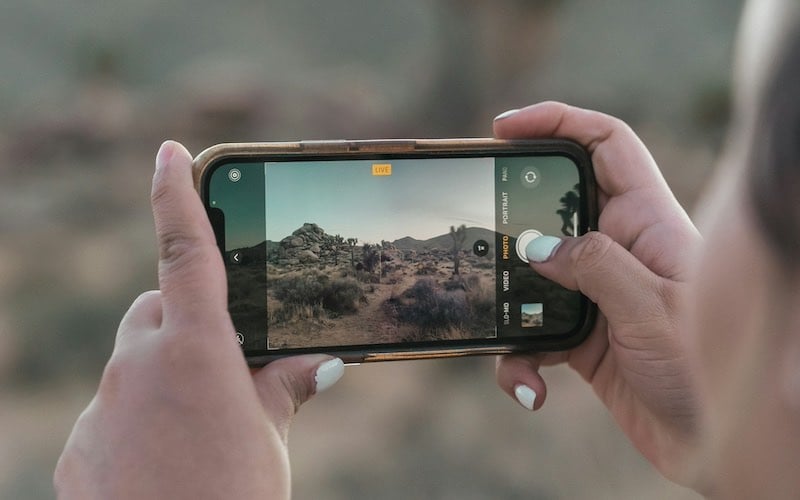
The first step in creating your iPhone Live wallpaper is to select a Live Photo. You can either take a new Live Photo using your iPhone camera or use an existing one from your photo library.
To take a new Live Photo:
- Open the Camera app on your iPhone.
- Ensure the Live Photo feature is enabled (you’ll see a yellow Live indicator).
- Capture your Live Photo by pressing the shutter button.
To use an existing Live Photo:
- Open the Photos app on your iPhone.
- Navigate to the Albums tab and select Live Photos.
- Choose the Live Photo you want to use as your wallpaper.
Step 2: Edit your Live Photo
If you want to tweak your Live Photo before setting it as your wallpaper, you can use the built-in editing tools on your iPhone. You can crop, apply filters, adjust lighting and more.
- Open the Photos app and select your Live Photo.
- Tap Edit in the top right corner.
- Make the desired adjustments and tap Done.
Step 3: Set your Live Photo as wallpaper
Now your Live Photo is ready, it’s time to set it as your wallpaper.
- Open the Settings app on your iPhone.
- Scroll down and tap Wallpaper.
- Tap Choose a New Wallpaper.
- Select Live to see your live photos.
- Choose the Live Photo you want to use.
- Tap Set and decide whether you want it on your Lock Screen, Home Screen or both.
Looking for an upgrade on a budget? Give musicMagpie a try! We’ve got plenty of amazing deals on refurbished phones, refurbished Macbook devices and much more, all with FREE delivery. Check out our amazing range of refurbished iPhone devices, including refurbished iPhone 12 models… it’s smart for you, smart for the planet!
You can also sell your iPhone for cash towards your upgrade. Get a free valuation for your iPhone today and see how much your device is worth!





Recent Comments
on Which British artist has sold the most albums?
on Who is the most popular video game character (based on sales)?
on Which British artist has sold the most albums?
on COVID-19 update: We’re here to help you work, connect and play from home
on COVID-19 update: We’re here to help you work, connect and play from home